Free printable chart
Viola fingerboard chart, free printable first position
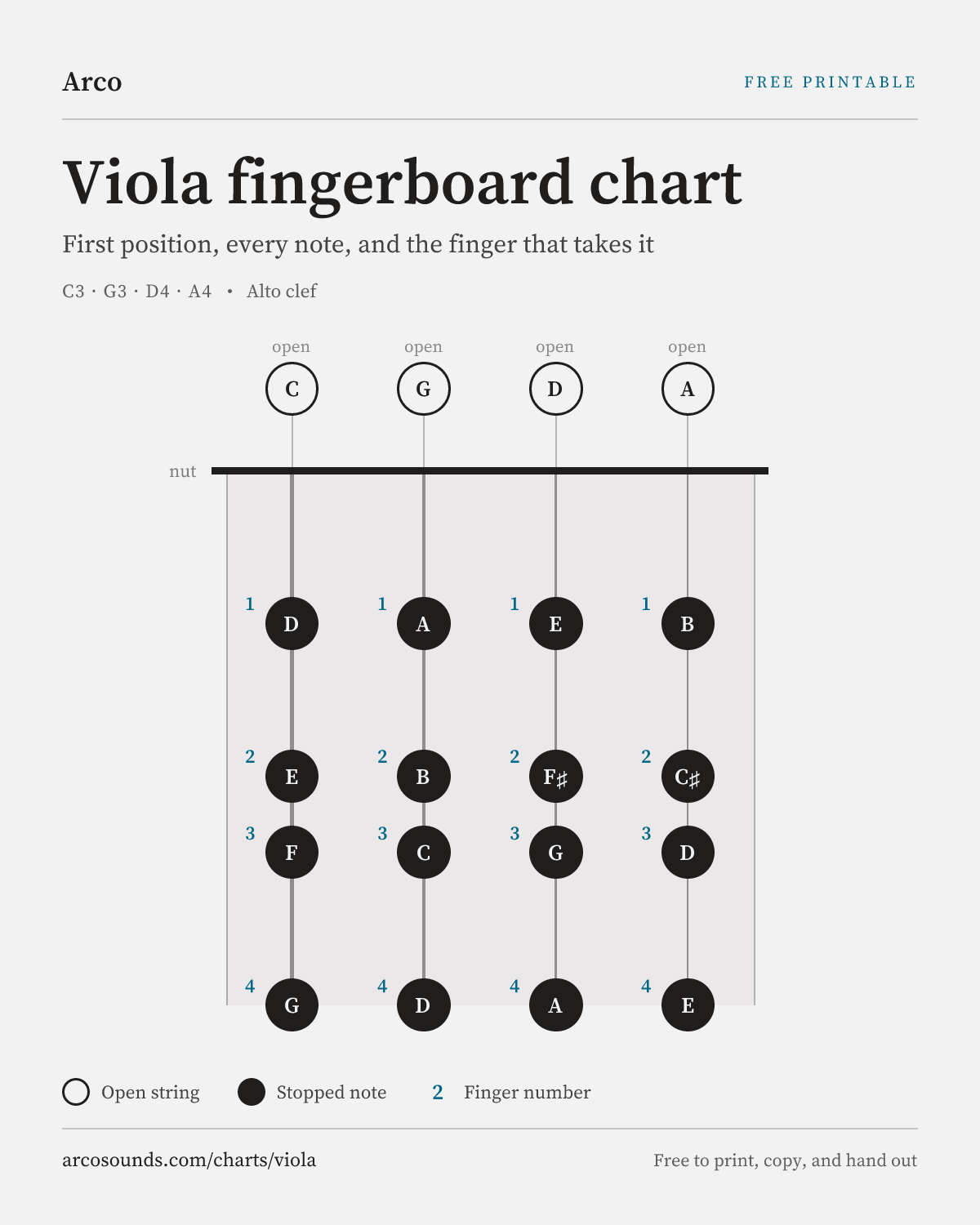
First position on all four viola strings, with finger numbers, and a reminder of where each note sits in alto clef.
Practise one string at a time
Each string has its own note table, short exercise and one-page PDF. These references show the selected first-position pattern, not every accidental or higher position.
Save it as an image
The same chart as a single picture, for a phone lock screen, a slide, a class page, or a group chat. It carries its own title and address, so it still says what it is after it has been forwarded three times.
- Format
- PNG · 1200 × 1500
- Licence
- Free to use and share
Prefer paper? The version above this one is built for a printer and comes out clean in black and white.
Every note on the chart
The same information as the diagram, written out, open string first, then each finger.
- C string
- CDEFG
- G string
- GABCD
- D string
- DEF♯GA
- A string
- ABC♯DE
How to read it
The viola shares the G, D and A strings with the violin, but has a lower C string instead of the violin's E. This reference uses the displayed note pattern on each string; the pattern still changes with accidentals and key. If you are switching from violin, read the alto-clef note before choosing its finger.
Strings run vertically, lowest on the left, nut across the top. Open strings sit above the nut; stopped notes are filled circles with the note name inside and the finger number beside them.
As on the violin, fourth finger matches the next open string above it. Checking that D on the G string against the open D, listening for the open string to ring sympathetically, is the fastest intonation feedback available without a tuner.
What a chart cannot tell you
- The frame shown is the selected pattern. Low second finger is the same hand with the finger moved back, not a new position.
- Viola string spacing is wider than violin, and wider again on a larger instrument. Charts show relative spacing only.
- Reading the notes in alto clef is the separate skill. The chart tells you where a note is, not how to recognise it on the page.
Printing and sharing it
Open the print dialog
Press Ctrl+P on Windows or Cmd+P on a Mac, or choose Print from your browser menu.
Check the preview
The chart appears alone on one sheet, the navigation and the text around it are removed automatically, and colours are set to black on white so it photocopies cleanly.
Print, or save as PDF
Print it directly, or choose "Save as PDF" as the destination to get a file you can email to a student or a section.
Teachers are welcome to print these for a class or a section and hand them out. The chart carries its own address in the footer, which is all the credit we ask for.
Viola chart questions
- What are the notes on a viola in first position?
- On the C string: C, D, E, F, G. On the G string: G, A, B, C, D. On the D string: D, E, F sharp, G, A. On the A string: A, B, C sharp, D, E. Those are the open string plus fingers one to four in the standard frame.
- Is the viola fingering the same as the violin?
- Violin and viola both use fingers one to four in first position and share G, D and A string pitches. The viola adds a lower C string instead of a high E. Its larger dimensions and alto-clef reading require adjustment; the chosen finger pattern depends on the key.
- How do I print this viola chart?
- Choose Download the PDF for a ready-made one-page file, free without an account or email. Print it at fit-to-page scale in black and white, or use the browser print button for the on-page chart.
- Where is middle C on the viola?
- Middle C, C4, is the third finger on the G string in first position. In alto clef it sits on the middle line of the staff, which is exactly why violists read that clef, it keeps the working range on the staff instead of on ledger lines.
A chart shows you where. Arco shows you why.
The viola curriculum builds the hand frame this chart describes, with the staff, the keyboard, and the fingerboard shown together on every concept.